Home>Drawing Tablet>XPPen Artist16 2nd Drawing Pen Display with Battery-Free X3 Stylus and 10 Customized Hot Keys, Full-Laminated Digital Art Tablet for Mac, Windows, Chromebook, Android(127% sRGB,15.4 Blue)


|
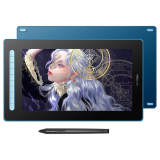
XPPen Artist16 2nd Drawing Pen Display with Battery-Free X3 Stylus and 10 Customized Hot Keys, Full-Laminated Digital Art Tablet for Mac, Windows, Chromebook, Android(127% sRGB,15.4 Blue) Item NO.: 10702744


Copy and share this link on social network or send it to your friends
Copy| Product Name | XPPen Artist16 2nd Drawing Pen Display with Battery-Free X3 Stylus and 10 Customized Hot Keys, Full-Laminated Digital Art Tablet for Mac, Windows, Chromebook, Android(127% sRGB,15.4 Blue) |
| Item NO. | 10702744 |
| Weight | 0 kg = 0.0000 lb = 0.0000 oz |
| Category | Drawing Tablet |
| Creation Time | 2026-08-22 |
【Outstanding Visuals】 the immersive 15.4 inch large screen with 1920x1080p full HD resolution presents your creation in the depth of detail, provides you with clarity to see every detail of your work.
【10 customized express keys】XPPen Artist 16 2nd monitor features 10 fully customizable shortcut keys and puts more customization options at your fingertips to suit you preferred work style, allowing you to capture and express your ideas easier and faster for optimized workflow.
【Full-featured USB-C cable】 XPPen drawing tablet can be easily connected with the full-features USB-C cable(sold separately), which can help you get rid of the mess, you can easily connect laptop that supports Type-C input to XPPen 16 2nd with only one cable.
【X3 Stylus Pen】 Artist 16 2nd Pen display is equipped with the latest X3 chip, ingenious pen performance needs just 0.1oz pressure-sensitive that XPPen will help you make your digital drawing vivid. 8 personalized express keys optimize your art workflow, save your treasure time, the painting or learning process will be more productive and enjoyable.
【Anti-glare screen】The matte eye-protective screen blocks the light interference from the environment, allowing you to focus on creation without distractions.
【4 trendy colors】4 trendy colors to showcase your personalities in different ways. Every one of them is selected to express the real you.
【Wide Compatibility】 XPPen Artist 16 2nd digital graphic screen is compatible with Windows 7 (or later), Mac OS X 10.10 (or later), Android (USB3. 1 DP1.2), Chrome OS 88 (or later), and Linux. Bring more possibilities to your creation.
【Tablet/screen switch】Long press the power button for 3 seconds, it will flash in blue and orange alternately. When the screen is off, the display will switch into a drawing tablet, giving you an additional drawing option.
【Package included】XPPen Artist 16 2nd drawing tablets with screen, 3 in 1 cable or 1 USB C-C cable (sold separately), welcome guide, our worry-free 12-month warranty, and friendly customer service. Start your sketch or animation design now!
【Online Teaching and Working】XPPen Artist 16 2nd computer graphics tablet is designed for digital drawing, painting, sketching, E-signatures, online teaching, remote work, photo editing, it's compatible with Microsoft Office apps like Word, PowerPoint, OneNote, Zoom, Xsplit etc. Works perfect than a mouse, visually present your handwritten notes, signatures precisely.
Richer Color Gamut
With a wide color gamut of 127% sRGB, 178° visible viewing angle, enhance your drawing experince.
Four colors, four size
The new Artist Series is available in four vibrant colors, choose your color, personalize your style, and show your unique creativity.
10 Shortcut Keys
Customize your shortcut keys in your software application of choice to simplify your workflow and empower your productivity.
Easy connection
The 3-in-1 HDMI cable allows regular connection to PC. The full-featured Type-C port also enables easier link with laptops and Android devices.
Wide Compatibility
Working well with various popular digital art software applications, such as Adobe Photoshop, Illustrator, SAI, CDR, GIMP, Krita, and MediBang.
You May Also Like


Recently Viewed

- Company Info
- Feedback
- Customer Reviews
- About Us
- Contact Us
- News
- Privacy Policy
- User Center
- Forget Password
- My Orders
- Tracking Order
- My Account
- Wanting to cooperate with us?
- Register
- Not Satisfied with our products or service?
- Payment & Shipping
- Customs & Taxes
- Locations We Ship To
- Shipping Methods
- Payment Methods
- Newsletter
Copyright © 2016-2025 Henao Bomaoer Commercial Cooperation. All Rights Reserved.



 Leave a message
No related record found