
Home>Drawing Tablet>XPPen Deco Pro Medium Graphics Drawing Tablet Ultrathin Digital Pen Tablet with Tilt Function Double Wheel and 8 Shortcut Keys 8192 Levels Pressure 11x6 Inch Working Area


|
XPPen Deco Pro Medium Graphics Drawing Tablet Ultrathin Digital Pen Tablet with Tilt Function Double Wheel and 8 Shortcut Keys 8192 Levels Pressure 11x6 Inch Working Area Item NO.: 10702752


Copy and share this link on social network or send it to your friends
Copy| Product Name | XPPen Deco Pro Medium Graphics Drawing Tablet Ultrathin Digital Pen Tablet with Tilt Function Double Wheel and 8 Shortcut Keys 8192 Levels Pressure 11x6 Inch Working Area |
| Item NO. | 10702752 |
| Weight | 0 kg = 0.0000 lb = 0.0000 oz |
| Category | Drawing Tablet |
| Creation Time | 2026-08-22 |
About this item
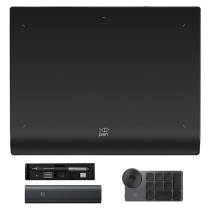
XPPen Deco Pro, the XPPen’s latest tablet release, makes its debut as the 2019 Red Dot Design Award Winner and the 2018 Good Design Award Winner. The Deco Pro Medium features an 11 x 6 inch working area, giving you a bigger canvas for your creations. Made with an aluminum casing and featuring a curved form as thin as 7mm, making it smooth to use and sleek in appearance
XPPen Deco Pro features the new groundbreaking double wheel interface combines a mechanical and virtual wheel that makes it possible to perform multiple actions with one hand, it’s easier and quicker than ever to capture, write, draw, and edit. The roller wheel comes equipped with an indicator light and adjustable brightness level, letting you stay immersed in your creation even in dim light. It also features 8 responsive shortcut keys, giving you instant access to specific functions
The XPPen Deco Pro supports up to 60 degrees of tilt function, quickly and easily responding to the way your hand naturally moves. Tilt function also delivers smoother and more natural transitions between lines and strokes while also giving you the ability to add shading to your creation. And the newly designed A41 battery-free stylus, no batteries or charging is ever required. There are no clumsy cords for charging and no extra cost for an extra pen
Deco Pro Medium with up to 8,192 levels of pressure sensitivity, the Deco Pro provides you precise control and accuracy. Create fine lines in a fluid and incredibly natural experience. Deco Pro comes with a multi-function pen holder to keep your pen and pen nibs safe. You can use it as a pen stand or as a case to keep your pen secure anywhere you go
The XPPen Deco Pro Medium is compatible with Windows 7/8/10, Mac OS X 10.10 and above, Chrome OS 88 or later, and works with most major creative software including Photoshop, SAI, Painter, Illustrator, Clip Studio, and more. XPPen provides a one-year warranty [warranty only valid under the situation that damage is not caused by man-made] and lifetime technical support for all our pen tablets/displays
Important Notice:
1. Deco Pro is NOT a standalone product!!!
This device must be connected to a laptop/computer/Chromebook/Android Devices to work. It is compatible with Windows system 10/8/7(32/64bit), Mac OS X version 10.10 or later and Chrome OS 88.0.4324.109 or above.
2. About the Product Surface
Electronics products often come with protective covers (plastic layer) to avoid damages to the surface from hand grease, scratches, etc. If there are any air bubbles or light scratches when you first get the tablet, please do not misunderstand it has been used, just need to remove the protective covers(plastic layer) before application.
3. Connection Tips
Your computer needs to have a USB Type-A port for the connection. Please confirm the USB Cable completely plug into your computer.
If your computer only has Type-c ports, you need an adapter for the connection.
Other Tips: After connecting all the cables in the correct places, please wait about 30s~1min to make the USB Hardware driver loaded successfully.
4. Driver Download and Installation Tips
Driver Download: Our driver will be regularly updated, so please go to our official web to download the newest driver, and install it on your computer.
4.1 Before Driver Installation:
Please Remove Other Brand’s Driver from your computer and reboot before installing the XPPen’s driver, or there will driver conflict problems.
4.2 For Windows Users:
Please close all drawing programs and run the driver as Administrator when installing the driver. (IMPORTANT)
4.3 For Mac Mojave (10.14), Catalina (10.15) Users:
Mac Mojave 10.14 or Above needs to add the "PenTabletSetting" and "PenTabletDriverUX" into the accessibility list first after installed XPPen Driver. Details steps please see the FAQ section on the XPPen web.
Mac Mojave (10.14) or above OS upgrade in the security section, you need to put programs you newly downloaded into accessibility list first to normally use it.
5. XPPen Provides Support on all Our Drawing Pen Tablets/Displays
When you have problems with the use of the Deco Pro Graphics Tablet, please checks the Quick Guide, search XPPen online to find a way toTech us for further assistance, we are always standing by to help!
If your order has any hardware problems within one year, we strongly advise you to contact XPPen, we will be glad to help you to replace it with a brand-new product (As long as the product is non-human made damaged or non-accidentally damaged).
Improved for Unparalleled efficiency
The groundbreaking double wheel design paired with trackpad functionality creates an improved experience for professional level creation. The new interface combines a mechanical and virtual wheel that makes it possible to perform multiple actions with one hand and helps eliminate distractions and interruptions from your workflow and creative process. With a unique two-wheel design, discover new creative worlds. Write, draw, create, and edit all while making sure the smoothest workflow possible and a complete focus on your creation.
Supports ±60 Degrees of Tilt Function
The XPPen Deco Pro supports up to 60 degrees of tilt function, quickly and easily responding to the way your hand moves. Tilt function also delivers smoother and more natural transitions between lines and strokes while also giving you the ability to add shading to your creation.
An Outstanding Drawing Tablet
The XPPen Deco Pro is made with an aluminum casing and features a curved sheet tablet as slim as 7mm, making it both smooth to use and sleek in appearance. The roller wheel comes equipped with an indicator light and adjustable brightness level, letting you stay immersed in your creation even in dim light.
Newest Technology Battery-free Stylus PA1
With up to 8,192 levels of pressure sensitivity, the Deco Pro provides you precise control and accuracy. Create fine lines in an incredibly natural and fluid experience, all with our newest battery-free stylus. Deco Pro comes with a multi-function pen holder to keep your pen and pen nibs safe. You can use it as a pen stand or as a case to keep your pen secure anywhere you go.
Compatible with Most Main Software
The XPPen Deco Pro Series is compatible with Windows 7/8/10, Mac OS X 10.10 and above and Chrome OS 88.0.4324.109 or above, and it's compatible with Photoshop, SAI, Painter, Illustrator, Clip Studio, and more. It’s also compatible with the XPPen Deco Draw Drawing App, supports connections with Android mobile devices 6.0 or above.
Package Includes
1x Deco Pro Medium Tablet 1x Battery-Free Stylus 1x Pen Holder 8x Replacement Pen Nibs 1x USB-C to USB Cable 1x USB to USB-C adapter 1x USB to micro USB adapter 1x Drawing Glove 1x Quick Guide
1. Online Teaching. Teachers and students can create and explain interactive content visually by writing, editing, and annotating directly in files and sharing their screen in real-time.
2. Web-conference. The Deco Pro M pen tablet allows you to start broadcasting for distance education or web conferencing, entering an interactive classroom or meeting room anytime, anywhere.
3. E-Learning. XPPen graphics tablets make your education journey much smoother and easier, and your education broadcasting more intuitive and attractive.
4. More to Explore. Simultaneous digital inking with an XPPen drawing tablet compatible with Microsoft Office apps like Word, PowerPoint, OneNote, etc. Visually present your handwritten notes, signatures precisely, and more.
You May Also Like



- Company Info
- Feedback
- Customer Reviews
- About Us
- Contact Us
- News
- Privacy Policy
- User Center
- Forget Password
- My Orders
- Tracking Order
- My Account
- Wanting to cooperate with us?
- Register
- Not Satisfied with our products or service?
- Payment & Shipping
- Customs & Taxes
- Locations We Ship To
- Shipping Methods
- Payment Methods
- Newsletter
Copyright © 2016-2025 Henao Bomaoer Commercial Cooperation. All Rights Reserved.



 Leave a message
No related record found